How Reglaze works
Reglaze gives your existing website a new design without rebuilding it. Your HTML, CMS, URLs and content stay exactly where they are — the new look is one stylesheet loaded on top. You see the result on your own site before you pay anything.
The five steps
Your cabinet shows these steps for every website, with the current one highlighted and one clear next action.
1. Free homepage preview
After you add a website, Reglaze reads its sitemap and links, groups pages by template (homepage, article, product, category…) and renders your homepage in a real browser on desktop and mobile. An AI designer then builds a design system for your brand — colours, type, spacing, buttons, cards, header and footer — and writes it as CSS for your real markup. The result is checked automatically for contrast, overlaps, alignment and mobile problems and revised before you see it.
Choosing how far to go
- Refresh — the same look, cleaned up: consistent buttons and cards, better type and spacing.
- Redesign — a clearly new look that keeps your brand colour and logo.
- Bold — a different, contemporary site; only the logo and content stay recognisable.
Motion can be static, subtle (smooth hovers), animated (content appears as you scroll) or expressive (the design's own elements move too: glows, patterns, accent lines, the main button). Visitors who turned on “reduce motion” always see the static version.
A brief is optional: “darker and more premium”, “closer to Stripe”, “keep our green”. It takes about 15–25 minutes; you can close the page and come back.
The free preview covers the homepage (in every language your site has). Links to other pages stay on the homepage and explain that those pages come with the full redesign — so you only ever see finished work.
2. Pick a style
Every preview has two views:
- Live preview — your real site, loaded through Reglaze with the new stylesheet. Click around, open it on your phone, use the Before / After switch in the bottom bar.
- Report — before / after screenshots on desktop and mobile, the palette and fonts, and what the automatic checks found.
Not quite it? Press Try another style with a different intensity or brief. You can compare up to 2 styles a month for free.
Almost right? Point at what to change: open the preview, press Comment and click the element. You get 3 free revisions on the preview of each website. Comments you haven't sent yet are not lost — when you buy the full redesign, they are applied to the whole site.
3. Buy the full redesign
In your cabinet, select the preview you like and press Buy the full redesign. It is $89 once per website and includes:
- the chosen look on every page type we find, desktop and mobile;
- automatic checks on hundreds of real pages across the site;
- a permanent install link and the CSS file to download;
- $50 on your edits balance.
After you choose, you get an order page: pay by card (Visa, Mastercard, Apple Pay, Google Pay) or crypto (USDT, BTC, ETH and more) on the payment provider's secure page. Payment is confirmed automatically — card within a minute, crypto after network confirmations — and the whole-site redesign starts right away. All orders are in Billing.
4. The whole site
We don't redesign from scratch at this point. The approved homepage design is locked — tokens, fonts, palette, components and motion — and extended to every other page type. We also download up to 1,500 pages of your site to find blocks that only appear inside content (tables, quotes, embeds, blocks from old editors, colours written into the HTML) and style those too. Then the same checks run on 100+ pages picked to cover every kind of block, problems are fixed, and the result is checked again.
This usually takes 60–90 minutes. Your cabinet shows the progress; when it's done, step 5 opens with the install instructions.
5. Install
Add this line to the <head> of every page, after your own stylesheets. You'll find it, with your personal key, in your cabinet:
<link rel="stylesheet" href="https://cdn.reglaze.io/i/YOUR-KEY.css">
The link always serves the design currently selected in your cabinet, including every revision. You never have to touch your site again after adding it. It is cached for a few minutes, loaded like any stylesheet and doesn't run any JavaScript.
Prefer to host it yourself? Press Download CSS and upload the file to your site. Downloaded files don't update — download again after a revision.
Install by platform
Any HTML site
Open your page template (or every HTML file) and paste the line just before </head>, below the other <link rel="stylesheet"> tags.
WordPress
Easiest: install a “header code” plugin such as WPCode or Insert Headers and Footers, add the line to the Header section and save. Or, in a child theme, add it to header.php right before </head>. Clear your caching plugin (WP Rocket, W3 Total Cache, LiteSpeed…) afterwards.
Shopify
Online Store → Themes → … → Edit code → layout/theme.liquid. Paste the line right before </head> (after {{ content_for_header }}) and save. Duplicate the theme first if you want a quick way back.
Webflow
Site settings → Custom code → Head code: paste the line, save and publish. Custom code requires a paid site plan.
Tilda
Site settings → More → HTML code for the HEAD: paste the line, save and republish all pages.
Wix
Settings → Custom code → Add custom code: paste the line, place it in Head, apply to all pages. Wix renders its own markup, so check the preview carefully first; some Wix elements can't be restyled.
Squarespace
Settings → Advanced → Code injection → Header: paste the line and save (Business plan or higher).
Google Tag Manager
Not recommended: styles injected by GTM load late and the page flashes the old design first. Add the line to your template instead.
Edits and versions
Anything you want changed, you point at:
Every version is kept. In the report you can restore any earlier one in a click; the next revision builds on the restored version.
Account area (pages behind your login)
If your site has a login area — a dashboard, orders, bookings, a profile, settings — it can get the same new design. Take it together with the site for $149 instead of $89 — you capture one page before paying, to see that it works on your site — or add it later ($60 in the first 14 days after buying the site, then $89): in your cabinet open the site and press Set up account pages.
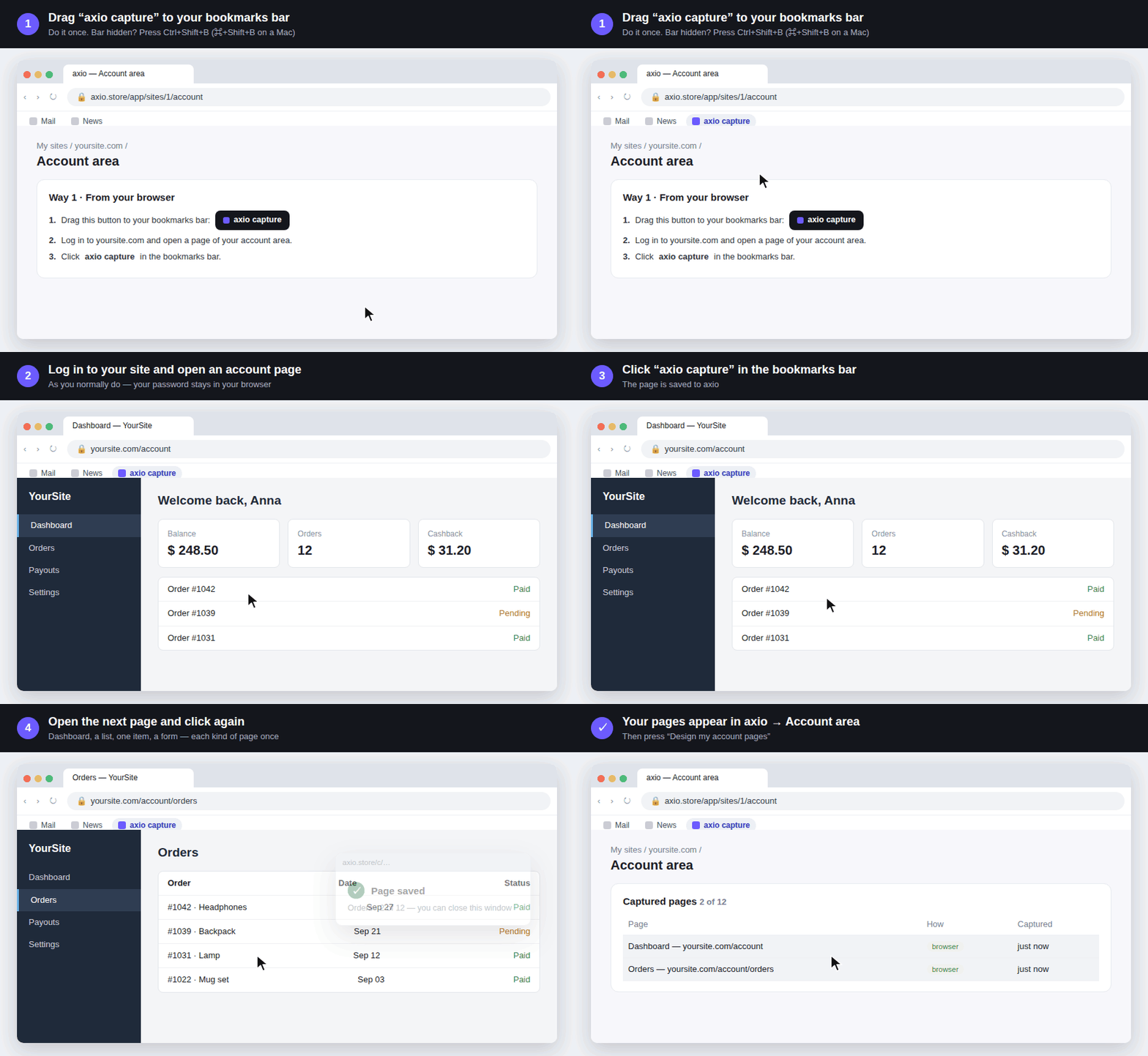
Our scanner can't log in to your site, so the pages come from you. Capture each kind of page once — the dashboard, a list (orders, bookings), one item, a form — up to 12 pages. Two ways:
- From your browser (recommended). Drag the Reglaze capture button to your bookmarks bar, log in to your site as usual, open an account page and click the bookmark. A small window confirms the page. No passwords leave your computer, and it works with two-factor login and captchas. Emails and long numbers (phones, cards, account numbers) are replaced before the page is sent; open menus or pop-ups before clicking if you want them designed too. You can capture the same page several times in different states (an empty list and a full one, a pop-up open) — each capture is kept.
- With a test account. Give us the login page and a test user's username and password. We sign in once, open the pages (the ones you list, or the links in the account menu), capture them and forget the login — it is never stored. We only open pages and never submit forms. This doesn't work with two-factor login, captchas or email codes.
The account pages are designed on top of your finished site design, which stays exactly as it is. They get the same colours, fonts and components, but as working screens: compact titles instead of hero banners, readable tables and forms, clear navigation and statuses. The result comes through the same install link. If the account area lives on a subdomain (for example app.yoursite.com) and shares your site's stylesheets, add the same line there too. If it is a separate app with its own styles, we detect that and give it a line of its own: it gets your design's colours, fonts and tokens, but none of the rules written for your public pages, so neither side can affect the other. Edits work as on the public site: Comment in the preview.
Which sites work
Reglaze restyles your site with one stylesheet on top of the pages you already have. When you add a site we check it automatically and show the result on the site's page, before you pay. What we look for:
- Can't be done: pages you can't add code to (marketplace shops, Linktree/Taplink, Google Sites, Notion, social networks); sites drawn on a canvas instead of HTML (Flutter web, Unity/WebGL); a homepage that is only a login form; AMP-only addresses; sites that block our scanner. A free preview of such a site stops before any work and doesn't use your free try.
- Keeps its own look: widgets shown in a frame from another service — payment forms, chat, booking, maps, video, embedded forms, social feeds — plus sealed web components and large animated/3D canvas areas. We restyle the space around them; many such services have their own colour settings you can match.
- Works, with care: auto-generated class names (they can change when your site is rebuilt), Tailwind-style utility classes, lots of inline styles from page builders, text baked into images, a security policy (CSP) that blocks outside styles — then allow our domain or use Download CSS.
- What a stylesheet never does: change your texts, add new blocks or pictures, or move sections to another part of the page. It is a new look for the site you have.
When your site changes
The design is written for your site's real components. If you rearrange existing blocks, they keep their look. If you add a new kind of block or section the design has never seen, it may appear in the old style: point at it in the preview with Comment (“style this like the other cards”) and it's done in the next revision, charged from your balance by actual cost. For a larger rebuild, run the whole site again from your cabinet.
Switching styles later
On a paid site you can preview a new style for the homepage (about $25) and, if you like it, apply it to the whole site (about $90), both from your balance. Your installed design stays live until you press Install this one on the new one.
Removing the design
Delete the line from your site and the original design is back instantly — Reglaze never changed anything else. If your account is closed or a purchase refunded, the install link serves an empty stylesheet, so your site simply shows its original design and nothing breaks.
Prices and balance
- Homepage preview — free, up to 2 styles per website a month. The previews belong to the website, not the account: anyone who adds the same site sees them, until the site is bought — then only the buyer does.
- Full redesign — $89 once per website, with $50 of edits included. No subscription.
- Full redesign + account area — $149 once. You capture one account page before paying, so you know it works on your site. Took only the website? The account area stays at $60 for 14 days after the purchase, then $89.
- Individual — from $490, one fixed price after an audit. For large, complex or business-critical sites — see below.
- Edits balance — revisions and new styles on a paid site are charged after they're done, by the actual AI processing they used (10× its cost). You always see an estimate first, failed or cancelled runs are free, and a charge never takes the balance below zero.
- Top-ups — $10, $25, $50 in Billing. Every charge and top-up is listed there.
Refunds: Refund Policy. Full terms: Terms of Service.
How big is my site?
Before you buy, we measure your site — for free, without changing anything. Two numbers matter: how many page types it has (homepage, article, product, listing…) and how many unique elements those pages are built from. Some sites have many page types made of the same few blocks; others have one huge page with hundreds of details — so we count both. A header and footer shared by every page count once.
The standard redesign designs up to 8 page types one by one — the ones that carry the most unique elements. Simpler page types share the same header, footer, buttons, forms and cards, so they get the new look too. A site with more than about 900 unique elements, or more than 8 page types that each bring their own elements, is a large site: your cabinet says so and offers the Individual plan.
Individual plan
For large, complex or business-critical sites. The standard redesign is automatic; here people are involved at every step. From $490, one fixed price quoted after the audit, no subscription.
- Audit before we start — A person goes through your site: page types, templates, forms, logged-in areas, what can and can't be restyled. You get a written report and a fixed price before you pay anything.
- Every page type, every state — No limit on page types. Pop-ups, forms, error and empty states and phone menus are covered too — not just what is visible when a page loads.
- Technical testing by hand — Desktop and phones from 320px wide, Chrome and Safari, contrast, forms, long texts — checked on your real pages, on top of our automatic checks.
- Staged launch — You approve a live preview first. The design goes onto your site only when you say so, and removing one line brings the old look back.
- 60 days of support — Edits at no charge, and we adapt the design when you add pages or sections during that time.
How it goes: you request an audit (or press Individual plan on your site's page in the cabinet) → we reply by email with the audit and a fixed price → the order appears in your cabinet and you pay it like any other → we work through the agreed page types, test, and you approve the preview before anything goes live.
Troubleshooting
I added the line but nothing changed
Check that it's inside <head> on the live page (view the page source), that it comes after your own stylesheets, and clear your site's cache and CDN (Cloudflare, WP Rocket…). The design only loads on websites whose full redesign is paid.
The design loads on some pages but not others
Some themes use different templates for different page types. Make sure the line is in the shared header, or add it to every template.
My site has a Content Security Policy
Allow our host for styles: add reglaze.io to style-src (and fonts.googleapis.com / fonts.gstatic.com to style-src / font-src if the design uses Google Fonts). Or download the CSS and host it yourself.
A block looks wrong
Leave a comment on it in the preview and send it as a revision. If it's something that shouldn't have happened at all — text you can't read, content cut off — write to us and we'll fix it without charge.
I changed my site's markup
New pages of an existing type pick up the design automatically. If a template changed a lot, comment on the new page in the preview and send it as a revision.
If your site blocks our scanner
Some sites use bot protection (Cloudflare, Wordfence, Sucuri, DataDome…). We detect it and retry through other networks, but the most reliable fix is to let us in:
- IP address:
57.128.178.43 - User-Agent contains:
axio-preview
In Cloudflare: Security → WAF → Tools → IP Access Rules, add the IP with the action Allow. In Wordfence: Firewall → Allowlisted IPs. Other firewalls have a similar “allowlist” setting. We only read public pages, like a visitor's browser does.
Contact
Questions, invoices, anything else: hello@reglaze.io.